First Night At Home

Well, Cyndi and Lydia are both asleep at the moment.  I'm not tired enough to sleep in the daytime yet, so I thought I would write a bit.

First, we had our first multiple diaper change last night.  Cyndi had just nursed Lydia and she was dirty.  I went to change her….right after I got the new diaper under her, she went again.  Well, I held her there for about 30 seconds (just in case it happened again) and decided no more was on its way so I cleander her up and did another diaper.  The same thing happened again!  I repeated the process, and the 4th diaper wasn't dirtied immediately.

Second, I think God has blessed us with a wonderful baby.  In the hospital, everything went well, and everything has continued to go well at home.  Lydia eats, we hold her a bit and try to play, then we put her down.  So far, she is sleeping soundly for 2-3 hours at a stretch.  But, I would like to emphasize that even if things weren't going so well, God did indeed bless us.

Third, I'm trying to get in my mind that Cyndi and I just caring for Lydia for a short time.  I know…18 years (or longer) may not seem short, but if she lives to 80 or 90, most of her life will be on her own.  She belongs to God.  We only watch over her and teach her right, etc….  While we have to do things right (take precautions, feed her, etc…) God is really in control.  He knit her together over the past 9 months.  We can take her to the doctor when she is sick, but He is really the one to heal her.  We can feed (or attempt to feed) her, but He is the one who makes the food and her body do their thing.  I think if I can get this mindset set early, things later on will be easier.

Fourth, I'm sure there are people praying for us and Lydia.  I'd like to ask that you keep my third point in mind when you pray.  Pray that Cyndi and I will do a good job caring for Lydia.  Pray that we would teach her right from wrong.  Pray that we would raise her and train her in the way she should go.  Pray for us that we would remain faithful in our Bible Study through this time of transition.  Pray that Lydia would know that Cyndi and I (and the rest of the family too) love her very much.  Pray that Lydia would know that Jesus loves her even more than we could.  Pray that she would see her need for a savior and accept God's gift of eternal life.  Pray that her walk with God after that point would be strong.  Pray that she would be willing, as the song says, to go wherever He leads.  Pray that we, as her family, would not be a hinderance to that.

Fifth, we discovered that just about all of the clothes we bought are way way to big.  And the sizes don't make sense:  We have stuff that is 0-6 months that is smaller than some 0-3 month stuff.  We didn't buy any newborn outfits because we were worried she would be right at the line and wouldn't wear them that long.  But, I think we are going to have to go get some anyway.

Well, I have written enough for now.  When Cyndi feels up to it, I'm sure she will post about the hospital stay in great detail.

Think it Can’t Happen Here?

According to WorldNetDaily,

Two men who are members of Gideons International, the Christian organization that is famous for, among other ministries, placing Bibles in motels and giving them to children, have been arrested after trying to hand out Bibles on a public sidewalk in Florida, according to a law firm.

Officials with the Alliance Defense Fund have confirmed they will be representing Anthony Mirto and Ernest Simpson, who were arrested, booked into jail and charged with trespassing.

Jeremy Tedesco, one of the ADF’s lawyers on the case, confirmed to WND that the organization’s clients were on a public sidewalk when they were handing out Bibles and school officials summoned police.

Did you ever think it could happen in America?  I sure didn’t.  And I can’t believe that the police actually knew so little about the rights that we as citizens have.

[Update 04-06-2007  08:53:45] I have a new post on this issue.  You can read the update by going to my post on Gideons, Persecution, and Free Speech .

Lydia Growth Pictures

I'm sure most of you have seen picture timelines.  No?  Well, imagine lining up 1 picture per year and watching the difference.  Cyndi and I have decided (actually, I thought it was cool and Cyndi didn't have any issues with it) to try that with our family since Lydia is here.  Follow this link to see Lydia's Growth Timeline in Pictures.

Starting Off Right

DSC00582

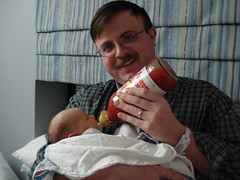
Well, I really enjoy hot food (actually, I enoy food with flavor, but that’s another story).  I wanted to make sure to get Lydia started off right, so Keith and Joy brought her a special bottle. Now, we aren’t really up for bottles, but I thought an exception could be made.  If you want a larger version of the picture, click the image to the left.

[Update 2012-12-26 14:12:16] Redid picture

Cyndi and Lydia Expected Home

Cyndi and Lydia are going to be released from the hospital today!  When they get home, I'll have some more pictures to post, and Cyndi has some stuff she wants to write about too.

Lydias Arrival

Lydia arrived at 9:05 am 4 Feb.  She weighed 7lbs 12oz and was 20 inches long.  Everything will be posted on the main maxsons.org page shortly.  I'm in the process of setting up Lydia's 1st website.  The address (once my hosting company has added it) will be http://www.maxsons.org/lydia.htm

Script to Create Playlists from Juice

In this post, I talk about my challenges of finding an application to use with my Sansa and podcasts. Well, I settled on Juice. But, I still had an issue with playlists. Juice allows you to launch a program after a file is downloaded, so I decided to write a script to do what I want. I thought I would post it here just in case anyone else is looking to do the same thing.

Here are the steps to get the script to work with Juice (I’m going to assume you already have downloaded Juice, installed it, and have several podcasts actively downloading.  I have Juice 2.2.  If you have a different version, the instructions may be a bit different.):

  1. Download the script (right-click this link and choose save target as.  Remember where you save the file)
  2. Launch Juice
  3. Go to File –> Preferences
  4. Go to the Advanced Tab
  5. Check the “Run this command after each download” checkbox
  6. In the text box, enter the following text (making the correct replacements, of course):  BuildPlaylist.vbs “” “%n” “%f”
  7. PathToVBS is the location you saved the vbs to when you downloaded it.
  8. PathToPlaylistFIles is probably something like c:Documents and SettingsMy DocumentsMy MusicMy Playlists
  9. You want to enclose each item in ” (those are double quote marks).  That way, Windows won’t barf on spaces
  10. Click the Save button

That’s it.  If you need some help, just let me know.  E-mail me at matt (at) techs4esus.com.

The script is below (or click here to download it):

””””””””””””””””””””””””
”Written By: Matthew Maxson (matt@techs4jesus.com)
”Date: 1 Jan 2007
”Copyright (c) Matthew Maxson
”This program is free software; you can redistribute it and/or modify
”it under the terms of the GNU General Public License as published by
”the Free Software Foundation; either version 2 of the License, or
”(at your option) any later version.

”This program is distributed in the hope that it will be useful,
”but WITHOUT ANY WARRANTY; without even the implied warranty of
”MERCHANTABILITY or FITNESS FOR A PARTICULAR PURPOSE. See the
”GNU General Public License for more details.

”You should have received a copy of the GNU General Public License
”along with this program; if not, write to the Free Software
”Foundation, Inc., 51 Franklin St, Fifth Floor, Boston, MA 02110-1301 USA

”To view the GPL, visit http://www.gnu.org/licenses/gpl.txt
””””””””””””””””””””””””
Option Explicit

Dim args
Dim num
Dim i
Dim fs
Dim fname
Dim WPLPath
Dim PlaylistName
Dim PathToAdd
Dim objTextFile
Dim objFSO

Function SortedFiles(objFolder, strFilePattern, strSortedBy, blnReverse)
‘From
”http://www.fpschultze.de/smartfaq+faq.faqid+124+PHPSESSID+8d9ee6d45fbecaf8b122c956a124ea58.htm
”Used with permission

Const TEMP_FOLDER = 2
Const WINDOW_STYLE_HIDDEN = 0

Dim objWS, objFS, objFiles, objFile
Dim strCmdLine, strTmpFile
Dim tmpArray
Dim i

SortedFiles = Array()
Set objFS = WScript.CreateObject(“Scripting.FileSystemObject”)
Set objWS = WScript.CreateObject(“WScript.Shell”)
strTmpFile = objFS.GetSpecialFolder(TEMP_FOLDER) & “” & objFS.GetTempName
strCmdLine = “%ComSpec% /C DIR ” & Chr(34) & objFolder.Path
If Right(strCmdLine, 1) “” Then strCmdLine = strCmdLine & “”
strCmdLine = strCmdLine & strFilePattern & Chr(34) & ” /B /A-D /O”
If blnReverse Then strCmdLine = strCmdLine & “-“
Select Case LCase(strSortedBy)
Case “name” strCmdLine = strCmdLine & “N”
Case “size” strCmdLine = strCmdLine & “S”
Case “ext” strCmdLine = strCmdLine & “E”
Case “datetime” strCmdLine = strCmdLine & “D”
Case Else Exit Function
End Select
strCmdLine = strCmdLine & ” > ” & strTmpFile
objWS.Run strCmdLine, WINDOW_STYLE_HIDDEN, True
If objFS.FileExists(strTmpFile) Then
If objFS.GetFile(strTmpFile).Size > 0 Then
tmpArray = Split(objFS.OpenTextFile(strTmpFile).ReadAll, vbNewLine)
objFS.DeleteFile(strTmpFile)
ReDim Preserve tmpArray(UBound(tmpArray) – 1)
Set objFiles = objFolder.Files
For i = 0 to UBound(tmpArray)
Set objFile = objFiles((tmpArray(i)))
Set tmpArray(i) = objFile
Next
SortedFiles = tmpArray
End If
End If

End Function

function DoesPlaylistExist(ThePathToWPLFiles, ThePlaylistName)
”we need to figure out if the playlist already exists or not
Dim FSO
Dim TheReturn

set FSO = CreateObject(“Scripting.FileSystemObject”)

if FSO.FileExists(ThePathToWPLFiles & ThePlaylistName) then
TheReturn = True
else
TheReturn = False
end if

set FSO = nothing
DoesPlaylistExist = TheReturn

end function

function CreatePlaylistHeader(ThePlaylistTitle)
”helper function to create the header
Dim TheReturn

TheReturn = “” & vbCRLF
TheReturn = TheReturn & “” & vbCRLF
” & Replace(Replace(ThePlaylistTitle, “.wpl”, “”), “_”, ” “) & “_SCRIPT TheReturn = TheReturn & “” & vbCRLF
TheReturn = TheReturn & “” & vbCRLF

CreatePlaylistHeader = TheReturn
end function

function CreatePlaylistFooter()
”helper function to create the footer of the playlist
Dim TheReturn

TheReturn= “” & vbCRLF
TheReturn= TheReturn & “” & vbCRLF

CreatePlaylistFooter = TheReturn
end function

sub MakeNewPlaylist(ThePathToWPLFiles, ThePlaylistName, TheFileToAdd)
”we’ll use this to make a new playlist
Dim FSO
Dim file

set FSO = CreateObject(“Scripting.FileSystemObject”)
set file = FSO.CreateTextFile(ThePathToWPLFiles & ThePlaylistName,true)
file.WriteLine(CreatePlaylistHeader(Replace(Replace(ThePlaylistName, “.wpl”, “”), “_”, ” “)))

file.WriteLine(“” & vbCRLF)

file.WriteLine(CreatePlaylistFooter())

file.Close

set file = nothing
set FSO = nothing
end sub

function GetDirectory(TheFileToAdd)
”use this function to split the path/file passed in. This will allow us to include other
”files in the same directory
Dim TheReturn

TheReturn = Left(TheFileToAdd, InStrRev(TheFileToAdd, “”))

GetDirectory = TheReturn
end function

sub EditExistingPlaylist(ThePathToWPLFiles, ThePlaylistName, TheFileToAdd)
”if we need to edit an existing playlist, we’ll use this file
Dim DirToCheck
Dim DirFileList
Dim Folder
Dim FSO
Dim file
Dim Filenamestr
Dim PlaylistFilename

DirToCheck = GetDirectory(TheFileToAdd)

set FSO = CreateObject(“Scripting.FileSystemObject”)
set Folder = FSO.GetFolder(DirToCheck)
DirFileList = SortedFiles(Folder, “*.mp3”, “datetime”, false)

set PlaylistFilename = FSO.CreateTextFile(ThePathToWPLFiles & ThePlaylistName,true)
PlaylistFilename.WriteLine(CreatePlaylistHeader(Replace(Replace(ThePlaylistName, “.wpl”, “”), “_”, ” “)))

for each file in DirFileList
PlaylistFilename.WriteLine(“” & vbCRLF)
next

PlaylistFilename.WriteLine(CreatePlaylistFooter())

PlaylistFilename.Close

set PlaylistFilename = nothing
set FSO = nothing
end sub

‘ OpenTextFile Method needs a Const value
‘ ForAppending = 8 ForReading = 1, ForWriting = 2
Const ForAppending = 8

set args = WScript.Arguments
num = args.Count

if num = 0 then
WScript.Echo “Usage: BuildPlaylist.vbs “
WScript.Quit 1
end if

WPLPath = args.Item(0)

if Right(WPLPath, 1) “” then
WPLPath = WPLPath & “”
end if

PlaylistName = Replace(Replace(Replace(args.Item(1), “:”, “”), “.”, “”), ” “, “_”) & “.wpl”
PathToAdd = args.Item(2)

if DoesPlaylistExist(WPLPath, PlaylistName) then
EditExistingPlaylist WPLPath, PlaylistName, PathToAdd
else

MakeNewPlaylist WPLPath, PlaylistName, PathToAdd
end if
[Update 2012-12-19 06:59:42] In getting ready to migrate my website, I found some broken links.  Fixed the link to the script.

Its almost time!

It's been quite a while since I've taken time to write. Pregnancy has been pretty fun and largely uneventful.  Everything has gone very well.  I feel good and Dr. Royal is very pleased with how we've done.  Matt and I have taken the labor/delivery classes and toured the hospital.  We're just waiting now…resting, reading baby books, making sure everything at home is ready, etc.   

She's not much of a kicker…her favorite activity is to stretch and push on mommy 🙂 Although, she's doing that less often these days as she has pretty much run out of space. While I am obviously in later pregnancy, I haven't grown out all that much, so she's really got to be feeling cramped! I'm not miserable or itching to be done with pregnancy, but I am definitely ready to hold her and share her with Matt (and the rest of our family and friends)!! We have been so blessed through this whole experience, how can we not recognize how fearfully and WONDERFULLY made by God we are??!!

As we wait for her to make her grand entrance, rest assured that we will post all the pertinent details and pictures when the time comes!!