One of the things that drives me batty about Vista is trying to figure out where things went. For example, your user settings and documents used to be under c:\Documents and Settings\<username>\ (in xp). In Vista, it is under c:\users\<username>\.
Ok..that’s not too bad…but what about my documents? Used to be c:\DocsAndSett\<user>\My Documents. In Vista, it is c:\users\<username>\Documents.
So why are there all these shaddow folders(c:\users\<username>\My Documents\ that look legit but give you an error if you follow them? I’m sure it is for legacy support…but how do you know that when you first look at them.
One of the new features of Google Voice is SMS forwarding (I guess that’s what you call it). In addition to sending phone calls from people to wherever you want, they’ll send SMS messages on too. Wow…that’s kinds cool, I thought. See, I have Google Calendar set up to SMS reminders and notifications to me. Why not replace my phone number there with my Google Voice number…then, I can start using my “one phone number for life” places.
So, I tried it. But, lo and behold, Google Calendar didn’t think I had a valid number. Shazbot!
[Update 09-01-2009 09:20:51] I was fiddling around on Google Calendar and decided to see if this worked today. Sure enough, it did. See this post for more information.
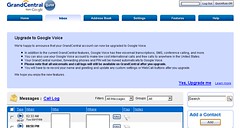
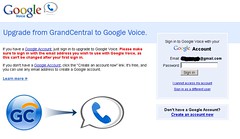
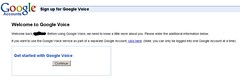
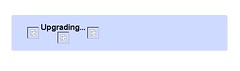
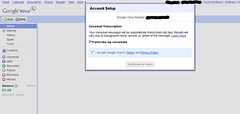
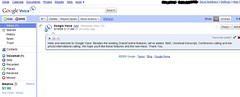
Well, today is the day! My Grandcentral account has been upgraded to Google Voice. Below are some screenshots I took of the process. For more on how I ended up with here, see these two posts.
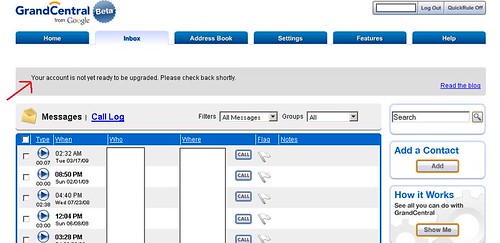
The upgrade message in GrandCentral
Step 1: Choose the google account to use
Step 2: Provide additional information. I didn’t have to do this…probabaly because I used an existing google account.
Step 3: Wait. About 30 sec or so.
Step 4: Accept T&C for voicemail transcription.
Step 5: Don. If you look close, you can see I was given $1 worth of credit to use. I guess this is to call international numbers. Calls within the US are free.
“Your account will soon be available for upgrade to Google Voice. Thank you for your patience”
What does that mean? Don’t know. To me, it means the same thing as the previous message. I went to the blog–as suggested–no additional information there. I guess it means that 1) sometime in the future I’ll have a google voice account and/or 2) someone got tired of fielding all the e-mails asking “when…when…when” so they decided to change the status message to tell everyone “soon.”
[Update 03-18-2009 09:24:35] As I was updating my previous post to point to this one, I thought I should add something. I understand why they didn’t do it all at once (heck, just the processing time to migrate everything would take some time to run). But, it would be nice to have a better error status message than your account is not yet ready. Why not make a blog post stating that this group goes first, this other group goes next, etc….? Then, they could have nipped the complaints in the bud–everyone would have known when they would be upgraded–and not had to answer tons of questions.
Now, if they just add in the ability to call it with SIP I would be set!
It has been several days since the announcement that GrandCentralwill become is becoming Google Voice. All accounts are supposed to be upgraded then the public rollout will happen. My account is still showing “Your account is not yet ready to be upgraded.” When oh when??
[Update 03-18-2009 09:23:42] See this post for my newest grand central status update.
I came across O2 (Oxygen) Wireless yesterday. Their gimic is that you can call 50ish countries (only landlines…of course) for nothing but normal airtime minutes. Their rates are kind of steep (14 cents as opposed to 10 cents from ATT) but, if you do international calling, it looks like a nice alternative to calling cards. From their coverage map, it looks like they piggyback off another cell company…I’m not sure who though.
I also found out that you can buy their SIM cards–so we know it is some GSM provider–at Best Buy.
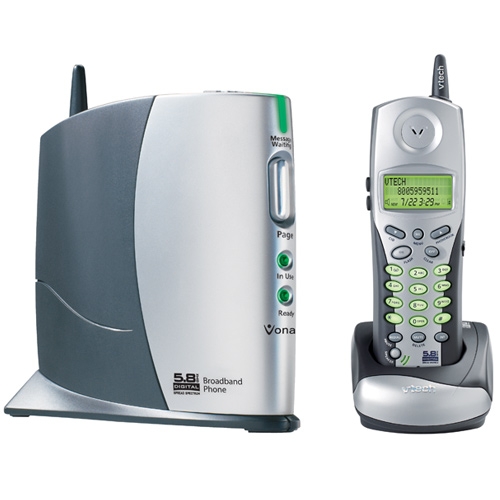
Cyndi andI brought a Vonage VTech 8100 phone with us to Serbia. At the beginning, everything worked great; however, we started having problems after a few months. Sometimes we would get real bad breakups, at other times, people would only hear clicks and pops, and at other times, they would hear simply dead air.
Well, we traced some of the problems to our internet connection; however, that left quite a few unexplained problems (dead air, clicks, etc….). We ended up and ordered a new battery from Amazon . We received it the other day, put it in the phone, charged it, and waited. Since then, we have made a few calls and haven’t had any problems. It looks like the battery was the cause of more problems than was obvious.
By the way, I still think what I think about Vonage and wish I had made a different choice in coming overseas. Although, I wouldn’t do it without having a voip phone…the convience is too nice.
Just in case you hadn’t heard, there is a new virus in the wild spreading like wildfire. As always, this wouldn’t be an issue if peple kept their machines up-to-date with patches.
Are you protected?
I haven’t seen any ideas about cleaning the virus. Anyone have any ideas on things to look for? Ho do you remove it out of the services.exe executable?
Well, last night (at about 1am) I was working on a new website when I realized I needed upload a whole boatload of pictures. I’m currently running dual boot Ubuntu 8.10 and Vista; however, I spend most of my time in Ubuntu. Great…this is a good job for rsync. Well, the directory had a mix of stuff in it, so I spent an hour of so futzing around trying to get the pattern include/exclude working right (I ended up and just dumped my patters into a file and told rsync to look there).
But, I get getting this error that I thought was related to having a space in the volume name (why oh why do people…and companies…insist on using a space in a filename. ARG. Just don’t do it). I tried to change the volume label thinking that would be the easy way (ubuntu mounts media to /media/<volume_name>). Nope…couldn’t do that; however, I did find an argument int he properties called Mount Point. Great. I just entered where I wanted it mounted (a complete path…like /media/<where_I_want_it>). Unmounted and tried to remount it. Uh oh…error time:
“Cannot mount volume. Unable to mount volume” . When clicking details the message “mount_point cannot contain the following characters: newline, G_DIR_SEPERATOR (usually /)”
Arg. What’d I do wrong? Why do things like this always happen in the middle of the night when I want to go to bed? ARG! I googled around and found this bug report on the Ubuntu website talking about the same error. Awesome! Something to look at!
Well, I figure that “/system/storage/volumes/_org_freedesktop_Hal_devices_voume_uuid_*/mount_point” has to be a config file (isn’t everything in Linux?) Uh oh. Can’t find /system on the filesystem. Arg. Oh wait…if I’d read more of the post, I’d see I need to use this special program because it is a registry type thing (gconf-editor). No sweat. I go to the command line and try torun it. No luck…command not found. ARG!
By this time it’s about 2 am and I just want to go to bed. But I can’t because I’ve got this stupid error to fix. No sweat. I go to install the app (Applications/Add/Remove) only to find it is installed. ARG. I go looking though the program list to try to find it. Nothing. ARG ARG.
Back to google. I finally figure out that to launch gconf-editor, I have to hit <alt> + <f2> and enter gconf-editor in the popup. That works. I locate the key, make the change and everything is fine (the whole problem stems from the fact that the mount point properties option exoects you to enter a name…not a path…just a name.)
Now, to get back to my original problem. Rsync works now (it wasn’t reading the space right). I start the files uploading and go to bed.