Before the most recent update of this website, I hadn’t done much more than simply look at generic vistor stats. But in it, I got some weird errors in the webstats so I dug deeper. I found I had this wierd random number (13 digits specifically) showing up as a 404 in my google stats. After some research, I found information here, here, and here.
The gist is that there was a problem with Google playing nice with some javasript. In my case, I think it must be disquis. I’ve updated everything and marked it as fixed. I’ll update this post if the problem returns.
After enough of that, I decided I had messed up a rule so I started looking some more. Finally, I found this page that was very helpful. Specifically, I learned what the difference was between $N and %N and how they worked. %N in a .htaccess file gives you a condition matched by regex in a RewriteCond line. The $N in a .htaccess file gives you access to the regex match in the first part of the RewriteRule line.
What do I mean? Here is an example for us to look at:
This will look in the query string and the first test will match &foo= followed by a number. The [0-9] means match digits and the + means match one or more instances. So, &foo= must be followed by 1 digit or more. The [NC] means case doesn’t matter so FOO and Foo and fOO all match.
The second test makes sure we are not matching things like barfoo=. The ! means we NOT whatever comes after.
The third test checks that the string does not contain bar= followed by digits. I had some cases where my query string contained both foo=1234 and bar=0987. I had to handle the bar=0987 part separately (and it overrulled the foo part of the string).
But what about the %1? Well, the first test has a regex (the part within the () ). Whatever that matches gets put into the % variables. In my case, the first test has a wild match and the third test has a wild match. so %1 contains whatever was matched after &id= (in my example above it would be 1234). %2 would get the numbers from the third line (0987). There is no % variable prduced on the second test because there is no regex matching.
Unfortunately, I still don’t understand too much about plain old RewriteRule. You can do the same sort of regex matching there and use the matched part when you actually do the rewrite. However, instead of using %N you use $N. You still have to match with a regex though, as I understand it.
Why did I go through all this work? Well, have a look at the following graph:
Yep, that shows server errors from my site. At the start of this process, I had none. It then spiked. And the reason it went back down was me using htaccess and modrewrite to take any old URLs that were erroring and redirect them to where they were supposed to go. I expect a similar drop in page errors; however, I’ll have to wait a few days to see that graph as google doesn’t crawl all of my pages every day.
Here’s the graph of page errors. The long gentle slope up is from these errors here that were a Google problem. But, have a look at the page errors. I’ve got almost all of them eliminated simply by analyzing what was going on and putting a bit of work into the problem to help you guys out.
Don’t forget you can only have 1-9 in each case.
[Update 2012-12-27 07:17:13] I thought I would add an example…just in case.
[Update 2012-12-27 15:45:15] Added a graph and showed how my errors were eliminated.
[Update 2012-12-30 19:11:55] Added graph of page errors
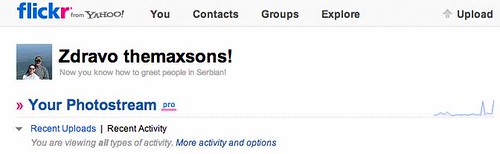
When you login to flickr, it greets you with hello in different languages. This morning, I saw the image above and was excited. Flickr greeted m in Serbian!
Our wishlist hadn’t been reviewed since…well, since I put it up. I decided I’d revisit it with the website changes. I removed a ton of stuff and updated more.
By the way, this isn’t posted because I’m trying to get people to send us stuff. I wanted a notice on the wishlist that I had looked at it as of such and such date. But, I can’t make it show up there and not here. BOO….
Is anyone else getting ssl mixed content warnings on the site? I’ve been getting them off and on; however, I can’t figure out what it is. Everything on the page looks to be delivered via https. Anyone (Bill, Alan) have any ideas?
[Update 2012-12-26 08:13:29] Here’s two posts that will need updating once I get this problem fixed: SSL and Maxsons.org Website Changes
[Update 2012-12-26 08:29:33] Something (my guess = disquis) was loading a resource from facebook (http://connect.facebook.net/en_US/all.js) via http. Stupid facebook…why wouldn’t they send that via https?? Anyway, I think I’ve disabled the login via facebook from disquis so this shouldn’t happen any more.
[Update 2012-12-26 08:33:21] Well, the error is gone but you can still login via facebook. ARG….
[Update 2012-12-26 19:48:53] I spent most of today working on the website. I think I’ve got everything sorted out with the mixed content messages.
After I migrated the website to an updated platform and enabled SSL, I thought I should check for dead links. Well, I found and corrected a bunch…I have a bunch more to finish. In this process, I found many of my dead links were for sites that had either gone dark (meaning I couldn’t find anything about them), moved (and left some sort of redirect), or just updated their site. In some cases, I don’t really care; however, in others, I wish I had the stats or main idea the article was making. So, here’s my question for my readers that blog:
How do you think I should deal with content from other sites? How do you handle it on your blog?
Also, when the sites went dark, I was removing the links from the text and adding a note at the end including the link (just not hyperlinked). What do you think about that idea?
What a way to spend Christmas evening…at the a&e (that’s what they call the emergency room in England). Why am I here?
Well Cyndi wanted a food processor. I got her one. Themetal blade was in this plastic case tthing. What a stupid idea I said. Well, as was washing it I sliced my finger… quite nicely. So Cyndi said I should come.
So…here I sit on Christmas eve waiting to be seen.
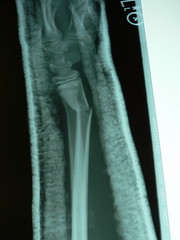
[Update 2012-12-25 21:53:37] It took about an hour to get seen. And what did they do? Put some tape on it and give me a sling. A sling! I wanted to ask how I was supposed to drive home. On one hand, in the states, I would have wanted more for my $100 ER fee. My first reaction is to say I’m glad I didn’t pay. Then, I remembered the OUTRAGEOUS amount of income taxes I paid here to provide this “free” healthcare. I want more for my thousands! Oh, I also added the picture. Click it if you want to see it in more detail.
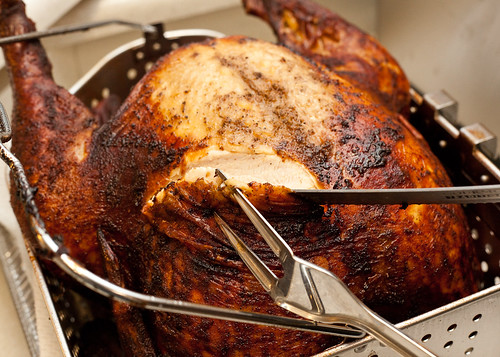
Here in England, it seems to be the tradition for churches to have a Christmas Day service. Several families at church have started getting together for Christmas Dinner. Well, Cyndi and I said we would deep fry a turkey if there was intrest. Well, even though Lydia is sick, Isaac and I went because we had to cook the turkey. Well, it was a hit. Everyone liked it. Isaac and I had an ok time because Cyndi and Lydia weren’t there.
I’ve got the website, I think, all converted to force SSL every place. I’ve also redirected a TON of URLs via .htaccess files to secure equivalents. Here’s a rundown of what I’ve done:
Maxsons.org -> https://www.maxsons.org files.maxsons.org -> https://www.maxsons.org/files media.maxsons.org -> https://www.maxsons.org/files/media update flickr pictures to use https in both the href and img src tags
The flickr stuff was fairly easy. I just had to run a couple of SQL queries to do a find and replace on a few fields in a few tables. By the way, if you care, the find and replace syntax for MySQL is:
update [table_name] set [field_name] = replace([field_name],'[string_to_find]’,'[string_to_replace]’);
In general, the check I use in the .htaccess file looks like:
RewriteCond %{HTTPS} off RewriteRule (.*) https://%{HTTP_HOST}%{REQUEST_URI} [R=permanent]
In reality, it isn’t that easy. From how I’ve seen it work, if you have one .htaccess file in a directory, that overrides something higher up. That means I’ve had to put a .htaccess file in each of the directories for the domains above and test several cases of with www and https, without www and https, with www and no https, etc… for each case. I think I finally have it worked out. Worst case, the [L] directive doesn’t seem to be working. What does L do in a .htaccess file? Well, I think it is supposed to tell Apache to stop processing redirects. Mine keeps going.
Oh, and while the URL gets rewritten, it doesn’t reassign variables in the .htaccess file. That means you have to order things right so stuff works out. Here’s an example:
When you get to line 4 (RewriteCond %{HTTP_HOST} !host1) to do a generic check of is https turned on or off, you have to also check to make sure you aren’t coming from a different host (files vs media vs www). If you don’t, you’ll end up and rewrite using the generic %{HTTP_HOST} with a wrong host and get certificate errors.
Oh, one other thing I did, after I had all the redirection already done, was to insert the following line into my .htaccess files:
Header set Strict-Transport-Security max-age:31337
If you are wanting to do something similar, that looks like the better way to do it. From what I’ve read (at eff and wikipedia) that header, by itself, would force a browser that understood it to make a https connection. If it couldn’t, the page wouldn’t load. But, if the browser didn’t understand it, the page would load via http. So, if you are starting out from scratch and didn’t already have 30 lines of .htaccess written, try that. If it works, you are done…if not, then you can delve into .htaccess and mod_rewrite.
Now, why did I do this? Over the weekend, I did some reading regarding rights and the government. I found out that the 4th Amendment–protection against unreasonable search–doesn’t apply if you’ve shared the information with a third party. This means the government can get a list of the phone numbers you have dialed from the phone company with just a court order…they don’t have to get a warrant. Now, enabling https on my website doesn’t help there; however, it does allow me to use a feature of my new hosting plan (a dedicated ssl certificate) to make the logins for the website safe so prying eyes at Starbucks can’t see my username and password. Or, better yet, someone can’t sniff my login credentials when I get set up to blog from my mobile phone (or upload pictures). A bonus is that no one can read the other stuff as it goes over the wire…that means a “bad guy” government couldn’t sniff packets and find out what I’ve written. Now, they could go to the website and look…but what if I make some things public and other things not…then you have to have the ID and password to login to see what’s up.
Oh, by the way, the 4th Amendment stuff I mentioned above means I may look to stop using disquis for comments and go back to native comments. But, on the other hand, comments are already shared with a 3rd party so is there a reasonable expectation of privacy there? Probably not….
Since I’ve migrated the blog, you may notice some articles change order and menu items not work. I’m working on updating these things. If you can’t find what you are looking for, use the Search function (at the top right of the page or here).
[Update 2012-12-27 08:04:20] All the problems should be fixed; however, I’ve decided to use this page for a generic “I’ve made changes” page. There were some things I couldn’t redirect. For example, some code from way way way back in the day when I used phpNuke. I’ve sent those things here…You’ll have to search if you came from a link like that. Leave me a comment, if you would like, and I can work on fixing specific one off things…