http://blog.jgc.org/2013/04/how-i-coded-in-1985.html
interesting
http://gizmodo.com/which-tech-companies-protect-your-data-from-the-governm-486127045
Nexus 7
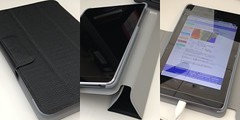
When my parents came over, they brought me a Nexus 7 (I wanted the 32 GB + mobile version). I had it all set up, but the battery life was horrible…and by horrible, I mean really bad. After doing some reading online, I decided to reset it. Well, after the reset, and reinstalling all the apps (well, most of them), battery life is much much better.
I also got a keyboard and a case.
I may end up and sell the keyboard if I don’t use it (it is really small). But, so far, I really like it. It solves all the problems I had with my Kindle Fire (basically, I couldn’t get the native gmail app, calendaring, etc…) with only one drawback (I can’t download Amazon Instant Movies). As I use it more over the next few weeks, keep your eyes open for more reviews.
Image from yto via flickr
yet another reason to encrypt email
http://thehill.com/blogs/hillicon-valley/technology/292989-irs-claims-it-can-read-emails-without-a-warrant
adobe updates…lol
http://xkcd.com/1197/
WD TV LiveHub
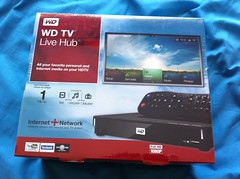
We brought a Western Digital TV Live Hub with us overseas. We did it for two reasons:
- It had a 1TB drive and I thought I would use it for backup
- But more importantly, it would hook up to our TV and let us watch Netflix
Occasionally, they come out with a firmware upgrade. Usually, there’s no problem with the upgrade; however, yesterday post-upgrade, launching the netflix app would cause the box to reboot. ARG. We don’t watch that much TV; however, I don’t like it when things break.
At first, I rolled back the firmware. Kudos to Western Digital for making it so easy. Many things don’t allow that to be done so easily….there’s no reason NOT to allow it. Anyway, after the rollback it still didn’t work. Now, I was really getting worried.
To fix it, I went in to the settings on the device and had it forget our login information. I then went into Netflix and had it deauthorize devices. I then redid the firmware update. Everything worked fine. I think the login information got corrupted somehow.
[Update 2013-03-23 08:39:25] The hard drive in our WDTVLiveHub failed. I’m not sure what happened, but I can’t see it. It will still play online content…it just doesn’t see the hard drive.
Backups
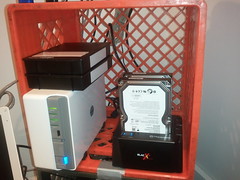
First, if you aren’t backing up…do it. You’ll be sorry when your computer crashes and your computer “guy” says ….I’m sorry but I can’t get anything off your drive. Do you have a backup?
Second, you should also think about what would happen if someone stole the hard drive you were using for a backup (or if you had a fire and needed to run out of the house).
I had covered number 1 easy enough…with an external hard drive.
I had covered number 2 sort of. I had my backup drives encrypted
But my failure was that my drives were all out of sync, I wasn’t sure what I had backed up or not, and was out of space. The computer doing the encryption of my local drives was slow (and only supported USB 1) so I couldn’t move the data around easily quickly (I had a 750GB drive and a 500GB drive). I also needed more space. I thought about a NAS, but the price drove me away. And I still wouldn’t have an off-site copy.
That let me to think often about online backups. Why should I have to buy a new hard drive when I could pay a service provider a small monthly fee?
But wait…I didn’t want the provider to have access to my files. I don’t want anyone having access to my files but me. Don’t get me wrong…I don’t have anything to hide. (But then again, you don’t write you love letters on post cards do you? Why? Do you have something to hide?).
I was also looking for unlimited space (like carbonite). And a family type plan that would let me backup multiple computers.
Well, I happened upon crashplan. Here’s the pluses:
Their client will let me do local AND cloud backups
They have a family plan for $14/month
They offer unlimited space
They have Mac and PC and Linux clients
They offer 3 levels of encryption (I picked the second).
I’m in the middle of the 30 day trial. I’ve found one thing I hadn’t thought of before this: speed. While crashplan doesn’t seem to limit my upload speeds (like I found out carbonite does more here). I seem to have dummed into that one because of my wanting encryption. But, I’m still limited by my ISP. I can upload at a blazing 1Mbit/sec (that’s .125 Mbyte/sec). Our initial seed is going to take forever! The better part of a month, if it is to be believed.
So, I think I’m going to keep it once the trial is open. I just didn’t think about the logistics of the initial seed.
Oh, I should add: crashplan offers a seed service where they’ll fedex you a hard drive, you back up, and send it back to them (they’ll do the same for recovery too). But it only works in the US.
Image from lmorchard via flickr
Odd Finder Display Problem
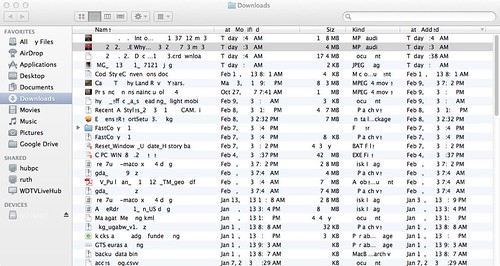
This morning, I downloaded a few sermons from Sermon Audio. When I went to rename them in Finder (on Mac OSx), the picture above it what I saw. Notice anything? Yeah….characters are missing. I tried doing a google search but didn’t find anything. I’ll reboot and see if the problem is fixed.
[Update 2013-02-12 06:58:22] Well, it didn’t take a reboot. After 30 minutes or so, everything returned to normal. Don’t know why. Don’t know what caused it.
Apple, Filevault2, and CoreStorage

Twice in as many weeks, I’ve had a Mac come across my desk with the disk hosed up. I mean really hosed up. In these cases, we give people a new computer, help them migrate whatever we can, then redo the old computer (it takes less time). But, in both of these cases, the hard drive has been encrypted with FileVault2. Now, that isn’t a problem (I had the passwords) but by this point, I just wanted to blow everything on the drive away and do a reinstall of everything.
But, if the disk is encrypted with FileVault2 (aka a Core Storage Volume) you can’t mess with it from disk utility. Even if you unlock it. You have to go out to the command line.
The first time I really hosed the disk and had to erase it (which you can do). The second time, I was able to simply erase the Core Storage Volume.
This site was where I found the commands: http://blog.fosketts.net/2011/08/05/undocumented-corestorage-commands/
I’m posting it here to help me when I need it again.
Image from Antimidia via flickr
FizzBuzz

I’ve read some posts over the past few days about FizzBuzz. Just for those who don’t know, it is a programming challenge one might challenge an interviewee with. Some people I’ve read say it is hard. This guy had a good idea to do it then throw the people into a meeting to see how they react to changing requirements. Personally, this is why I try to “over think” things.
It isn’t hard. Why? Here’s some pseudocode:
out = “”
for x = 1 to 100:
if x mod 3 = 0:
out = “Fizz”
if x mod 5 = 0:
out = out + “Buzz”
print out
That’s it. 2 if statements and some string manipulation. If you wanted to make it more expandable, do something like this:
min = 1
max = 100
test1 = 3
test2 = 5
out = “”
out1 = “Fizz”
out2 = “Buzz”for x = min to max:
if x mod test1:
out = out1
if x mod test2:
out = out + out2
print out
You could also expand on this with a structure like an array for the loop, etc… It depends on how much one wants to engineer it and make it expansible. It isn’t hard. Frankly, I don’t think I’d hire someone who couldn’t do it. The reason I like the code review/changing requirements test is seeing how people think under pressure and modifying something they’ve worked on.
Image from Sean MacEntee via flickr