Well, I’ve sold the trusty e65 that I bought before we left the US and moved overseas. Why? Well, it went on the fritz and the mic decided not to work all the time. So, I bought me a Google Nexus S. But then, what should I do with my old phone? We saw an advert on the tv for mazuma mobile. They’d give me 10 pound for my phone (over 20 if it was working). That’s enough for a case and screen protector so I said sure.
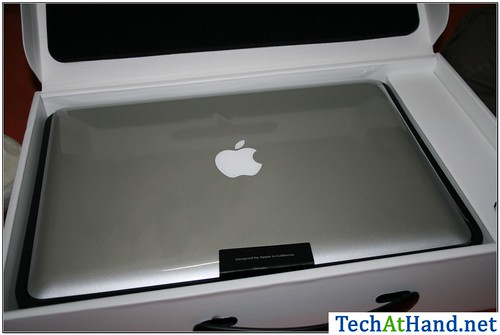
I got a Mac (a 13″ MacBookPro) about a week before Christmas. Before you ask, no, I didn’t buy it…I’ve got to support Macs at work so they got me one. Prior to this, I’d only spent about 30 min messing with a Mac. Overall, I like it. Although, I have problems with the way they lock their hardware and software together…I’d love to run OSx on other hardware. I’ve also come up with some minor tweaks….little things that drive me crazy. I thought I’d blog them here and see if anyone has suggestions:
Touchpad. The guestures are great, but why do I actually have to click it? Why can’t I just tap it like on a PC touchpad? And don’t get me started on the click noise.
Keyboard. The keys feel farther apart than on a standard desktop keyboard. I feel like I have to move my hands 10 miles to type.
Hover. There’s no hover functionality. In a PC, I could hover my mouse over the icons in the systray–that area down by the clock–and find things out. Like how much more battery is left. On the Mac, I can’t just hover over the icon…I have to click it.
Quit. Why doesn’t the red x actually quit the program. I don’t want the thing to just hide…I want the app to quit running. To do this, I have to hit command-q.
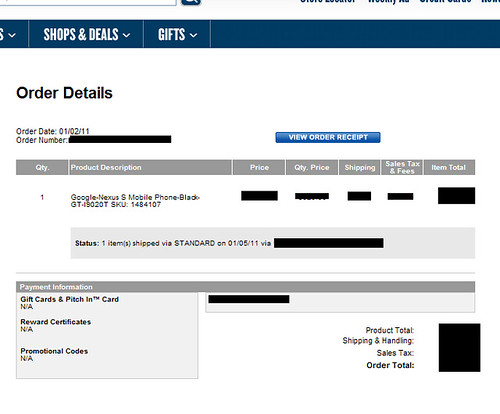
In an update to this article, my Nexus S has arrived! It actually arrived prior to Best Buy’s order system even telling me it was shipped. Holy cow…what a horrible shipping system.
As of 7am (GMT) the order site was saying it wasn’t shipped yet. I was all worried and hacked off. I get to work and find out that not only had it shipped but it had arrived.
Well, my Nokia e65 went on the fritz so I decided to get a new phone. So, I ordered the Nexus S from Best Buy. Ordered on the 2nd of Jan with a promise of 0-1 day fulfillment. Their website hasn’t updated since then. Tried to call them only to get some lame-o non-answer. I’ll post more when I know it.
[Update 2011-01-11 15:42:40] Not only has it shipped, but it arrived prior to Best Buy even being able to tell me that it had shipped. For more information, look here.
See that key? Macbooks don’t have one. Well, let me be more specific…they have a key labeled delete but it acts like the key on a PC keyboard labeled backspace. Not a big difference…Backspace deletes from the cursor to the left while delete deletes from the cursor to the right. I googled it and found an article telling me that fn + delete on a Mac acts the same way. More learning to do…..
Last year for Christmas, I bought Cyndi a kindle. I thought it would be a great ereader for her while she was in the hospital having Isaac. Turns out the thing was awesome! I liked it so much, I told her I wanted one. So, for my birthday, I’m getting a kindle. But why?
Why buy a kindle today instead of something like the iPad? I thought about getting an iPad, but didn’t. Here’s why I picked the kindle:
Price. The kindle I bought Cyndi was $259. Recently, they lowered the price to $189. To get the same connectivity in an iPad (3g) I’d have to spend at least $629 (the cheapest 3g+wifi iPad) but….
Connectivity. With the Kindle, Amazon pays the wireless bill. With the iPad, I’d be paying for my own 3g service. And yes, you can browse the web on the kindle…the 3g isn’t just for buying books (like it is on the nook)
International connectivity. Again, Amazon is paying the wireless bill and the kindle works around the world. With an iPad, again, I’d have to pay the bill but the Kindle includes it. Contrast this with the nook where you can only buy books if you are in the US.
A logical question would be why not the Nook? Well, points 2 and 3 explain why. With the nook, the 3g is only for getting books. B&N doesn’t let you browse the web with it. On top of that, you can only buy books from B&N if you are in the US.
Oh, I read this interesting comment the other day about what the Kindle represents. Don’t think of it as something else you have to carry with you…think of it as a library you don’t have to carry with you:
For the people who buy a Kindle, it isnt another device you have to carry around, it is a pile of books you DONT have to carry around!
[Update 2012-12-26 15:40:13] Some internal links changed. I’ve updated them.