Good Job Advice

Another day in my cubicle at work #newsfromthecube

One of the blogs I read regularly is The Art of Manliness.  I forget where I first found it, but it is a great blog.  Great advice for men, teen boys, and anyone else looking to become a well-rounded person.  And it avoids the sexual angle that is so prevalent on so many other “lad-blogs.”

Anyway, this week, I finally got around to reading their article on your first day and week at a new job:  Hit the Ground Running: How to Ace Your First Day and First Week at a New Job.  Here’s a summary of the main points (and my thoughts on one of them)

1. Before your first day
     Do your research
     Set out what you need the night before
     Brush up on your business etiquette
     Dress for success
     Aim to arrive ten minutes early
     Carry yourself with confidence
     Take the initiative in introducing yourself
     Take notes

2. How to Ace the First Week
     Ask lots of questions
     Listen, observe, and research
     Decorate your space
     Set up a calendar
     Create a to-do list notebook
     Don’t talk about how things used to be done at your old job
     Send your first Friday Update

That last one is one I really like.  A Friday Update.  The article says

The Friday Update is a short email that “functions to communicate your progress and the status of your current projects and tasks.” Here’s what they [Bennington and Lineberg] recommend including in the update:

Accomplishments this week
Challenges or stumbling blocks (areas where you need direction or input)
Noteworthy opportunities, suggestions, and insights
Issues that need your boss’s input or approval
Your schedule and goals for the coming week

I work on a 5 person team spread out geographically (and in different timezones).  My supervisor/boss isn’t in the same country as me.  I really like this idea to summarize what I did and what I plan to do.  I think I’m going to start doing that.

Image from slworking2 via flickr
Asus WL-330N (3g) Review

wl-330n3g

In my job, I travel to lots of places where people are having meetings to work on their computers.  We do this because we get the most “bang for the buck” so to speak by going where people are then working on their computers.  But, that means we don’t have control over the environment we find ourselves in.  Or what resources are available.  We can get around this by taking hard drives with software and updates for our use.  However, there are cases where wifi is spotty (that’s being nice).  An example would be a meeting I recently went to in Morocco:  wifi was available in the lobby but not the meeting room.  But, in one corner of the meeting room we could, occasionally, leech wifi off another hotel.  That corner was really popular.

Enter my quest for a router I could take with me places.  A colleague suggested an Apple Airport Express (he has one).  The size was right but it didn’t do everything I wanted.  I then thought about getting a stock router and installing DD-Wrt.  Well, after looking, I didn’t think DD-Wrt did everything I wanted.  So, I kept looking.  But, before I go farther, I suppose I should tell you my requirements:

  1. work as a traditional access point (give it an ethernet internet connection and have it broadcast it)
  2. work as a bridge (connect to the internet via wifi then give that signal over wired connection)
  3. #2 except rebroadcast on a SSID of my choice
  4. be small

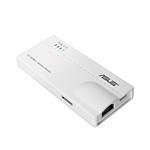
#3 turned out to be the hardest.  After looking, I didn’t even think that ddwrt would do what I wanted.  I kept looking.  And looking.  And looking.  Finally, I stumbled on the Asus WL-330n3G.  This thing does everything:

  1. I can plug it into an ethernet port and broadcast my own SSID (complete with DHCP, firewall, etc… services)
  2. I can connect it to a wireless network and give any wired devices access to that wired network
  3. I can reshare that wireless on a SSID of my choice
  4. I can simply repeat a SSID, if I want
  5. I can even connect a USB 3G modem and share that internet amongst devices
  6. Best of all, this thing is small.  About the size of a credit card and perhaps 1/2 inch thick!
  7. And even better, it is powered by USB.  AND they included an AC->USB power adapter
  8. Even more better, the price was only £31 (about $50)!

I haven’t taken it any place with me yet, but I think this little guy will come in very handy!

this morning…

I woke up at 4:30 am too pick someone up at the airport.  Holy cow….it was already daylight! Not dawn but daylight.  And we’ve got a month until the longest day of the year.  Wow

25 May 2013 — Rochester, UK

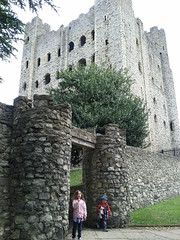
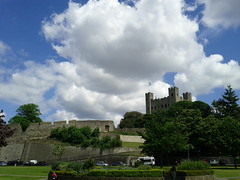
On May 25th, we went to Rochester.  Our original goal was to go to Rochester Castle.  We made it and had an excellent time.  The castle grounds are free…you just have to pay if you want to visit the keep.  Of course, if you are an English Heritage member, entrance is free.  The keep is really well preserved for being built in the 1100s!  Here are a few pictures and our flickr set has all of the pictures.

IMG_20130525_124235 IMG_20130525_141417

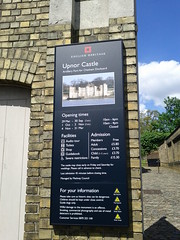
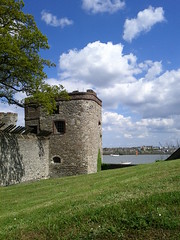
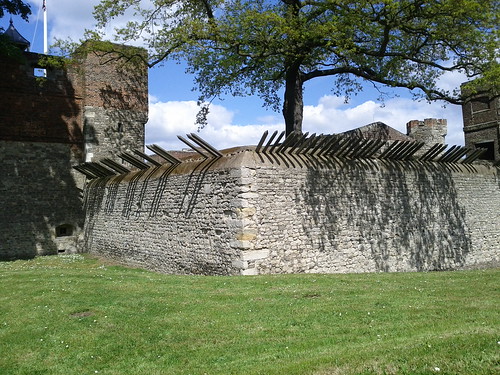
As we were leaving, we saw a sign for Upnor Castle and decided to go.  I’m glad we went because I learnt a great deal about English History.  Turns out that the English kept their navy in this estuary that was guarded by Upnor Castle.  Then, in 1666 (I think) they had a big battle with the Dutch where numerous ships were lost.  Of course, they don’t keep their navy here any longer (the ships are too big) but it was a neat place to see (and has made my I’d like to go back to) list.  Here’s a few pictures from it, and as always see this set on flickr for more.

IMG_20130525_143550 IMG_20130525_143821
IMG_20130525_143817

weird experience

As I got off the plane from agadir Morocco there were some border security guys there checking… just looking… at everyone’s passports.  I still had to do passport control like normal.

This was just out of the ordinary

{JoooidContent “type” : “map” , “id” : “1368028529380” , “width” : “400” , “height” : “300” , “align” : “center” , “latitude” : “51.45852” , “longitude” : “-0.44575” , “map_type” : “MapTypeId.ROADMAP” , “zoom” : “7” , “text” : “Heathrow Airport Terminal 4”}