SSL and Maxsons.org

Oh brother where art thou

I’ve got the website, I think, all converted to force SSL every place.  I’ve also redirected a TON of URLs via .htaccess files to secure equivalents.  Here’s a rundown of what I’ve done:

Maxsons.org -> https://www.maxsons.org
files.maxsons.org -> https://www.maxsons.org/files
media.maxsons.org -> https://www.maxsons.org/files/media
update flickr pictures to use https in both the href and img src tags

The flickr stuff was fairly easy.  I just had to run a couple of SQL queries to do a find and replace on a few fields in a few tables.  By the way, if you care, the find and replace syntax for MySQL is:

update [table_name] set [field_name] = replace([field_name],'[string_to_find]’,'[string_to_replace]’);

http://www.mediacollege.com/computer/database/mysql/find-replace.html

In general, the check I use in the .htaccess file looks like:

RewriteCond %{HTTPS} off
RewriteRule (.*) https://%{HTTP_HOST}%{REQUEST_URI} [R=permanent]

In reality, it isn’t that easy.  From how I’ve seen it work, if you have one .htaccess file in a directory, that overrides something higher up.  That means I’ve had to put a .htaccess file in each of the directories for the domains above and test several cases of with www and https, without www and https, with www and no https, etc… for each case.  I think I finally have it worked out.  Worst case, the [L] directive doesn’t seem to be working.  What does L do in a .htaccess file?  Well, I think it is supposed to tell Apache to stop processing redirects.  Mine keeps going.

Oh, and while the URL gets rewritten, it doesn’t reassign variables in the .htaccess file.  That means you have to order things right so stuff works out.  Here’s an example:

RewriteCond %{HTTP_HOST} host1
RewriteRule ^.*$ https://NewLocationHost1%{REQUEST_URI} [NC,R=perman$
RewriteCond %{HTTPS} off
RewriteCond %{HTTP_HOST} !host1
RewriteRule (.*) https://%{HTTP_HOST}%{REQUEST_URI} [R=permanent]
RewriteCond %{HTTP_HOST} ^DomainWithNoWWW$
RewriteRule ^.*$ https://DomainWithWWW%{REQUEST_URI} [R=permanent]

When you get to line 4 (RewriteCond %{HTTP_HOST} !host1) to do a generic check of is https turned on or off, you have to also check to make sure you aren’t coming from a different host (files vs media vs www).  If you don’t, you’ll end up and rewrite using the generic %{HTTP_HOST} with a wrong host and get certificate errors.

Oh, one other thing I did, after I had all the redirection already done, was to insert the following line into my .htaccess files:

Header set Strict-Transport-Security max-age:31337

http://www.debian-administration.org/article/662/Enabling_HTTP_Strict_Transport_Security_on_debian_servers

If you are wanting to do something similar, that looks like the better way to do it.  From what I’ve read (at eff and wikipedia) that header, by itself, would force a browser that understood it to make a https connection.  If it couldn’t, the page wouldn’t load.  But, if the browser didn’t understand it, the page would load via http.  So, if you are starting out from scratch and didn’t already have 30 lines of .htaccess written, try that.  If it works, you are done…if not, then you can delve into .htaccess and mod_rewrite.

Now, why did I do this?  Over the weekend, I did some reading regarding rights and the government.  I found out that the 4th Amendment–protection against unreasonable search–doesn’t apply if you’ve shared the information with a third party.  This means the government can get a list of the phone numbers you have dialed from the phone company with just a court order…they don’t have to get a warrant.  Now, enabling https on my website doesn’t help there; however, it does allow me to use a feature of my new hosting plan (a dedicated ssl certificate) to make the logins for the website safe so prying eyes at Starbucks can’t see my username and password.  Or, better yet, someone can’t sniff my login credentials when I get set up to blog from my mobile phone (or upload pictures).  A bonus is that no one can read the other stuff as it goes over the wire…that means a “bad guy” government couldn’t sniff packets and find out what I’ve written.  Now, they could go to the website and look…but what if I make some things public and other things not…then you have to have the ID and password to login to see what’s up.

Oh, by the way, the 4th Amendment stuff I mentioned above means I may look to stop using disquis for comments and go back to native comments.  But, on the other hand, comments are already shared with a 3rd party so is there a reasonable expectation of privacy there?  Probably not….

[Update 2012-12-26 08:12:01] I’m getting mixed content warnings.  I can’t see what’s wrong…can anyone help? They are fixed.

[Update 2012-12-27 07:32:51] If you came here looking to see how % or $ work in htaccess files, check out this post where I give some examples and explain % and $ in htaccess files.

Image from legofenris via flickr 

Battery Life

Mobile Phones

Watching Jingle All the Way tonight got me thinking about cell / mobile phones.  That got me thinking about this article where I describe all the phones I have owned.  As I glanced at it, this comment stuck out:

It didn’t take me long to figure out that I needed to purchase the extended battery for this guy. And, even with that, I only was able to get 2…maybe 3…days out of this thing.

Complaining because I only got 3 days out of the battery.  I’d love to do that today.  Now, I can’t even go one day without plugging my phone in.  Wow!

Image from yisris via flickr

Google Chrome “Other Devices” feature

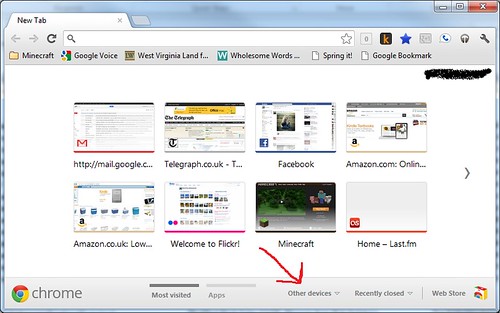
I’ve been using Google Chrome ever since I got my Nexus S last year.  A week or so, I noticed a feature I’d never noticed before:  the other devices option.  Here’s a screen shot:

20120920_ChromeScreenShot

I’d never used it before; however, today I had a reason to.  I had been doing some research using my Mac; however, I wanted to look at the site this morning on my Windows 7 box.  Instead of having to logon to my Mac, I just opened up chrome, selected other devices, picked my mac, and the website.  Very nice.

Tree

Hora do canto

Have you ever needed to print a directory tree?  No, I’m not talking about a simple directory listing, I’m talking about a tree.  Like this:

├───2009
│ ├───A
│ │ ├───1
│ │ ├───2
│ │ ├───3
│ ├───b
│ │ ├───1
│ │ └───5

I knew I had done it before but couldn’t remember how.  I only needed it for a 2 minute thing so I just printed the dir output and called it good.  But, I couldn’t leave it.  That is when I found:

TREE

The tree command did exactly what I wanted.  Hope this helps you if you ever need/want to print a directory tree in Windows.

Image from eduarti amorim via flickr

In 10-20 years, this will be a bigger issue

869 Paris-Marais

Hands up if you’ve ever bought music from Apple’s iTunes?  What about a book from Amazon on the Kindle?  Yep, I’ve done both (although, I’m moving away from Apple and to Amazon), and I’m sure you have too.  What is your view about what happens when you die?  I’m sure you haven’t thought about…or if you have you’ve assumed that your kids would have them.  For me, this is an issue because I’ve taken to buying digital books and music exclusively (well, where possible) But…..

Have a look at this article:  Bruce Willis is talking about suing Apple so his kids can have his iTunes music collection.  Why is this such a big deal?  Well, because if you have bought digital books or music, I assume you haven’t thought about it.  I assume you assume that your kids will get the “stuff” just like any of your other stuff.  BUT, that isn’t the case.  By default, you can’t transfer the “stuff” to another person.  In 10, 20, 40, or 50 years when people start dying and want to transfer these digital assets to their kids, I think some kids are in for a large shock when they don’t get it (under current law).  So, if he does sue them and win, it will be a game changer in this realm.

[Update 2012-12-26 09:46:54] Edited a few links

Image from i am not i via flickr

Curiosity has landed

Moon Venus Mercury & Mars

I had read that the Curiosity Rover was due to land sometime, but wasn’t sure when.  This morning, after having my quiet time, I turned on Sky News to watch the news.  I ended up tuning in 30 sec before the rover landed.  So, I stumbled onto seeing the rover land.  It was neat to see. 

[Update 2012-08-06 06:42:33] Here’s a link to a liveblog of the event.

[Update 2012-12-26 09:54:24] The liveblog link changed

Image from sleepychinchilla via flickr

Internet Redux

Ok…this might not be a big deal to any of you out there, but I wanted to write about it.

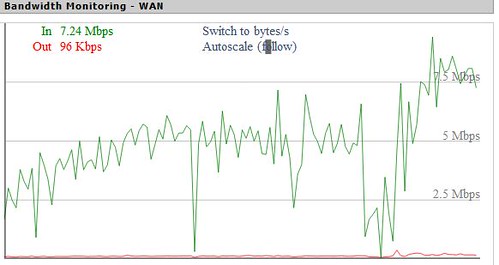
Have a look at this graph:

internet2

What is it?  That is a screenshot of the WAN bandwidth going through our strongvpn router set-up.  What does this let us do?  It makes any device connected to this router look like it is in the US.  But, for the past few months, we’ve been fighting slow speeds…really slow speeds.  HOWEVER, yesterday, I made some changes and, once the internet settled down, it looks like the problem is resolved.  We went from getting < 1Mbit/sec to this.  And look how constant it is….no big bursts…no slowdowns…just plain old good data transfer.  Now this is pretty good considering that we get about 8Mbit/sec off the VPN.

What’s the big deal you ask?  Well, we went with Virgin Media (and are paying them 30 quid per month instead of 7.50 with Sky) because they were the only ones who would offer us unlimited unshaped internet where we live.  This is what I’m paying for…not the performance we were getting.  Hopefully it stays!

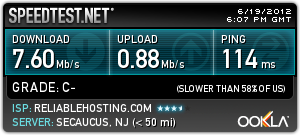
[Update 2012-06-19 19:08:27] Ran a speed test this evening.  Here are the results:

20120619_speedtest

[Update 2013-10-02 13:33:47] We are getting FIBER!

Who Pays

mobile phones

If you live in the US, do you ever worry how much it costs to call a cell phone (as opposed to a regular phone)?

If you live outside the US, do you ever worry how much it costs to talk on your mobile phone when someone calls you?

The answer to both of those questions is usually no.  But, if the other group were to answer the other question, the answer would probably be yes.  Why?  Well, because of two different ways cell/mobile calls are paid.

In the caller pays system (what most of the world uses), the person who calls the mobile phone pays the cost of the phone call. The person receiving the call pays nothing.

In the other system (receiver pays) model, the call costs the same as if youwere calling a normal phone.  The person with the mobile phone pays to get the phone call to their wireless device.

I’ve lived in both places.  I like the fact that if someone calls my mobile, I don’t have to pay.  But I never like the fact that the person calling me pays for the call.  Why should they have to pay more because I choose to have a mobile/cell phone?  Given the choice, I would choose receiving party pays all the time.  It was my choice to have a mobile phone…why should someone else be penalized because having a landline is unnecessary?

Image from phossil via flickr